The appeal of running your own language models is real: no API costs, no rate limits, no data leaving your network, and a fallback chain that still works when a cloud provider has an outage. I’ve been chasing that for a while. This week I finally sat down and measured what I actually have.
The short version: the potential is there. The hardware isn’t. Yet.
Moving Ollama to the Server
I’d been running Ollama on my desktop. The problem with that is obvious once you think about it — the desktop sleeps, reboots, and isn’t shared. If a bot wants to use a local model at 3am, it’s out of luck.
The fix was straightforward: move Ollama to server01, which runs 24/7. One config change in NixOS, a nixos-rebuild switch, and suddenly all five bots have access to local models all the time. I also added Open WebUI while I was at it, which gives a ChatGPT-style interface to the local models. More on that later.
Building a Benchmark
Before wiring the bots up to anything, I wanted actual numbers. Which models are worth running? What’s the quality tradeoff for smaller models? Can any of them do tool use reliably?
I built ollama-bench — a small service that runs a standardized test suite against every model and scores them across quality, coding, and tool use. Results go into a dashboard so you can compare runs over time.
Here’s what the latest run looks like:
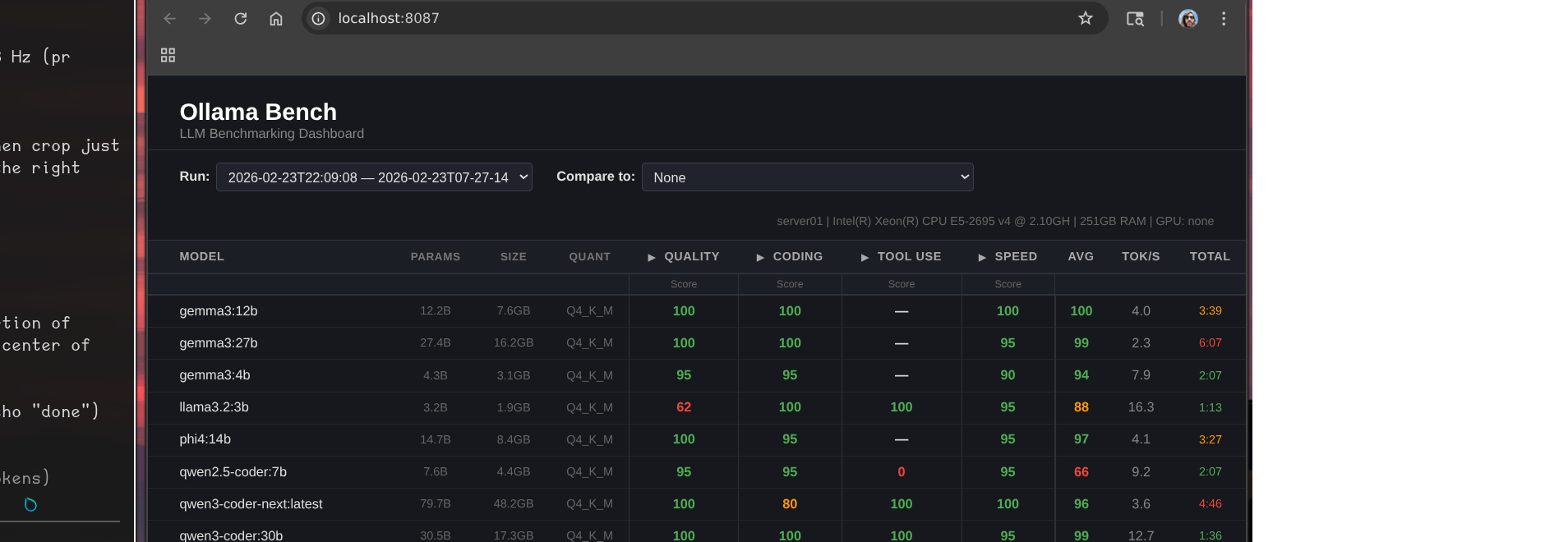
That header line tells most of the story:
server01 | Intel(R) Xeon(R) CPU E5-2695 v4 @ 2.10GHz | 251GB RAM | GPU: none
The Grafana dashboard gives a live view of what’s actually running:
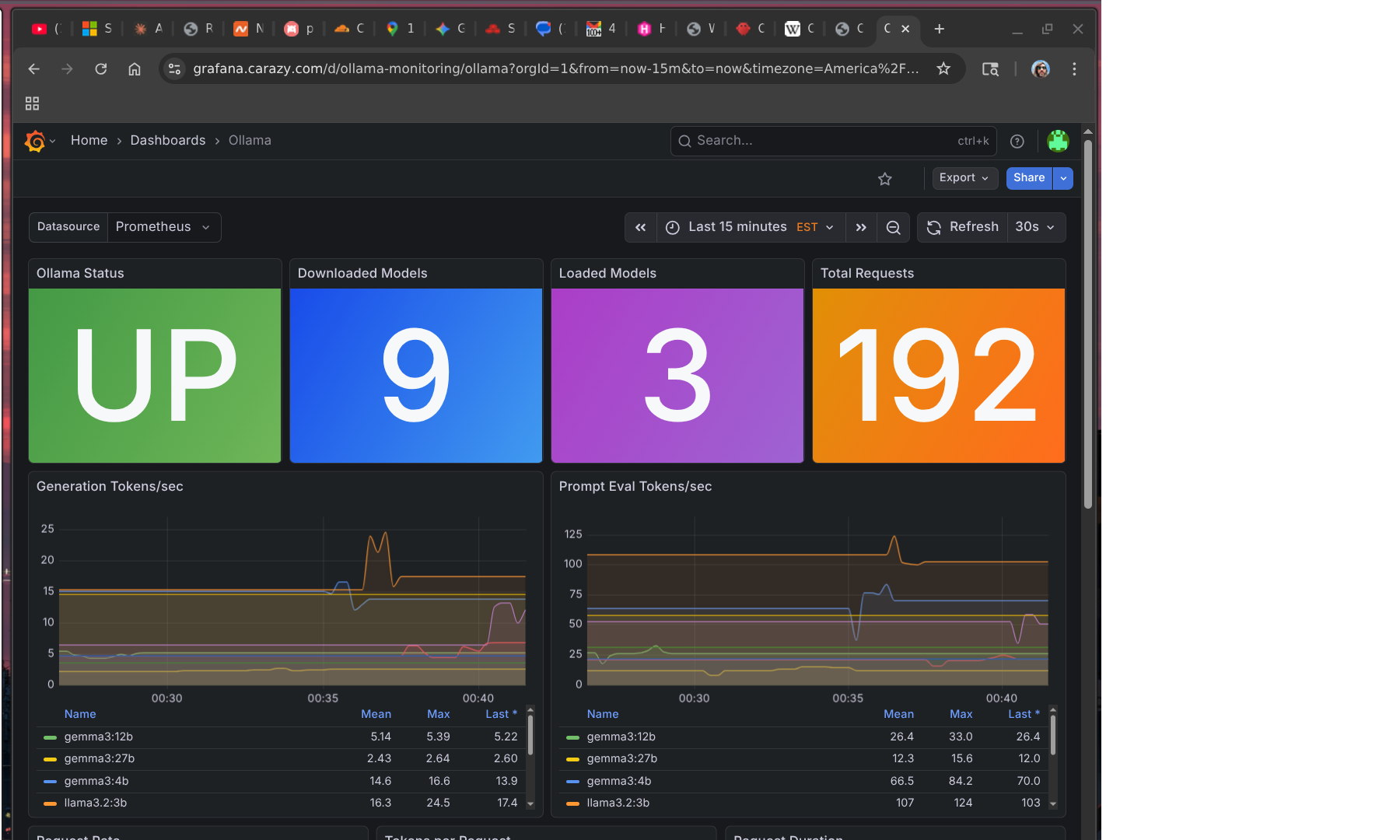
179 requests served, 9 models downloaded, 3 loaded in memory. Looks healthy. The tok/s numbers tell a different story.
The Numbers
A few things jump out:
llama3.2:3b is the only model that’s actually usable for real-time interaction. 16.3 tok/s, 1:13 for a full benchmark run. It also scores 100 on both coding and tool use — the only model that reliably handles function calling. The quality score is only 62, which shows in general reasoning tasks, but for structured agentic work it punches above its weight.
gemma3:12b is the quality leader. Perfect scores across quality, coding, and speed categories, 4.0 tok/s. The catch: “speed” here is relative — 3:39 for the benchmark suite, which in practice means 30-60 seconds for a real response. Fine for async tasks, frustrating in conversation.
qwen3:14b took 16 minutes. It’s a mixture-of-experts architecture that activates many more parameters than its 14B label suggests. The scores are excellent. The inference time is not a number I can work with.
gemma3:27b scored a 99 average and took over 6 minutes. Beautiful model. Completely unusable for anything interactive.
What This Actually Means for the Bots
I’m running five OpenClaw bots on this hardware. The models I’m realistically using locally right now:
llama3.2:3bas default for Bob — fast enough for Discord, handles tool calls, cheap to rungemma3:12bfor async tasks where I don’t care about latency — summarization, document review, background research
The rest of the lineup is theoretically impressive and practically too slow. A six-minute response in a Discord channel is not a response, it’s a timeout.
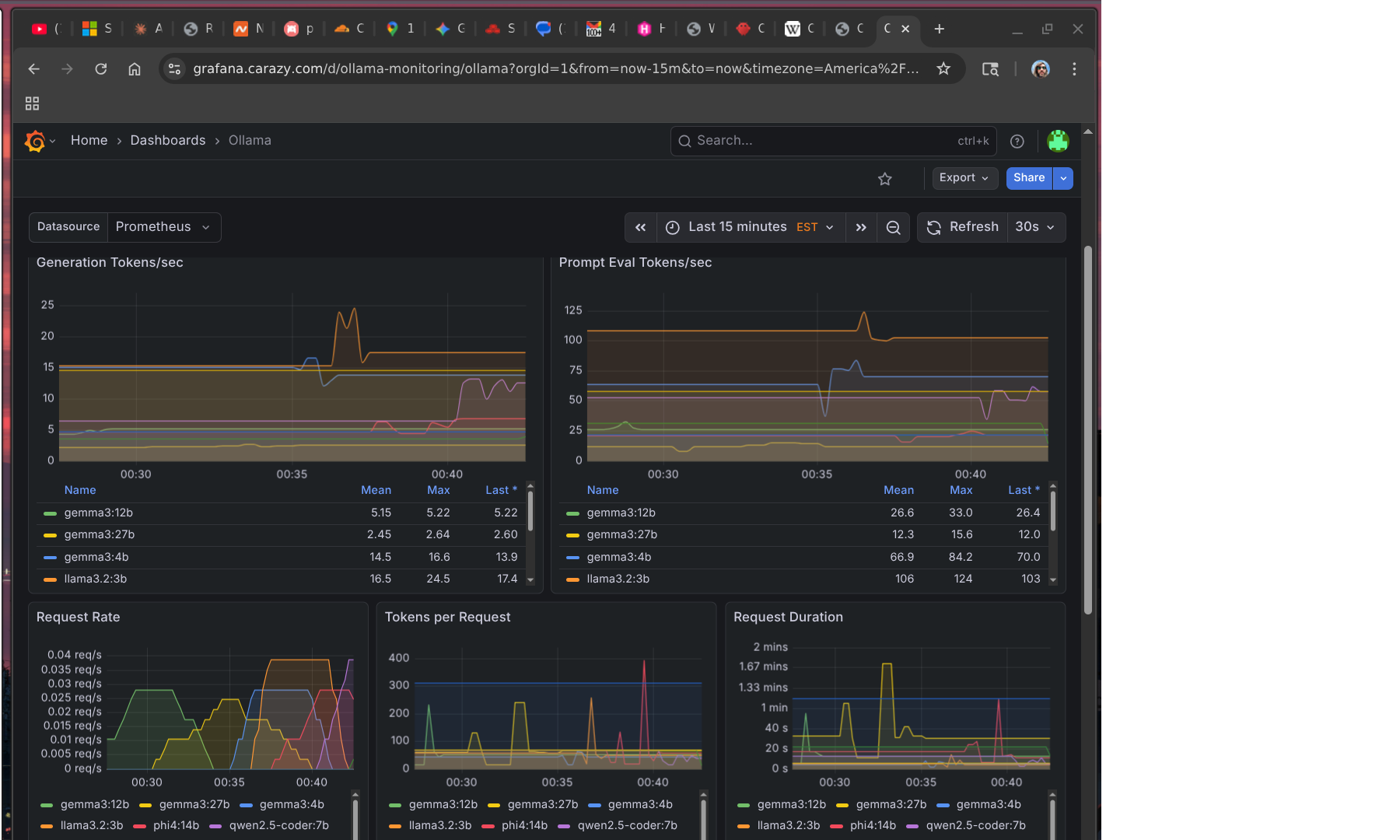
You can see this play out in the metrics. The token rate charts break down by model — llama3.2:3b is doing most of the real work because it’s the only one fast enough to be practical:
The benchmark also exposed something I hadn’t fully accounted for: most of my models have no tool use at all. The gemma3 family, phi4, qwen2.5-coder — none of them produced valid tool calls. Only llama3.2:3b, qwen3-coder-next, and qwen3:14b could. That significantly narrows which models I can actually use for agentic work rather than just chat.
Where Local Models Do Work
The use cases that make sense right now aren’t real-time conversation — they’re offline, async, time-insensitive tasks:
- Daily site summaries — have a bot scrape a set of URLs overnight and produce a digest by morning
- Code review passes — queue a review job, get results whenever
- Document processing — ingest and summarize PDFs, meeting notes, etc.
- Draft generation — first pass on something a human will edit anyway
None of these care if the response takes 3 minutes instead of 3 seconds. The latency that kills Discord conversation is invisible in a cron job.
I’m building more of my workflows around this model. Bots that need to be responsive use cloud APIs. Bots doing background work get the local stack.
The GPU Question
The obvious fix is a GPU. The server is a Dell PowerEdge R630, which takes half-height PCIe cards.
The options I’m looking at:
- Tesla P4 — 8GB GDDR5, ~$80-125 used. Designed for inference, half-height, fits the chassis. Would push
llama3.2:3bto somewhere around 80-100 tok/s and bringgemma3:12binto usable real-time territory. - Tesla T4 — 16GB GDDR6, $500+ used. Newer architecture, double the VRAM, fits. Would let me run
phi4:14bandgemma3:12bat real-time speeds and potentiallygemma3:27bfor async at something reasonable.
The T4’s extra VRAM is tempting — VRAM is genuinely the constraint here — but $500+ is a hard sell when the P4 gets me most of the way there for $80-125. I’m leaning P4 first, see what it unlocks, and revisit from there.
The Token Problem
This is the part that doesn’t get talked about enough.
Running bots costs tokens. If you’re not paying attention, it’s easy to burn through a surprising amount. A bot that’s in several active Discord channels, responding to conversations, running tools, reading context — that adds up fast. Multiply by five bots and you have a non-trivial monthly number.
Local models are partly about solving this. But there’s a layer above the infrastructure: most AI providers explicitly don’t want you running bots on their subscription plans. The pricing math doesn’t work for them when one “user” is generating 10x average token volume. Direct API access is the intended path for operators — and direct API costs more per token than a subscription.
OpenAI is an interesting exception. They seem notably more permissive about agentic use of subscription access. That may be partly philosophical — they’ve historically been more aggressive about agentic use cases — and it’s worth noting that Peter Steinberger, who built OpenClaw, just announced he’s joining OpenAI and moving the project to an open-source foundation. The company that hired the person building the most popular self-hosted agent framework is probably not going to be the company cracking down on agents using their products.
For now my strategy is: local models for volume, cloud APIs for quality-sensitive tasks, and constant attention to what’s actually burning tokens.
The One Thing That’s Actually Great Right Now
Open WebUI.
I added it mostly as a convenience layer and ended up using it daily. It’s a clean chat interface that routes to whatever local model you want, remembers conversation history, and works well enough that I reach for it over Claude.ai for quick things. It doesn’t have the same reasoning depth, but for “summarize this” or “draft a quick reply to this email” it’s genuinely useful and costs nothing per query.
That’s the local model success story for now: not the bots, but the chat interface. The bots will get there when the hardware catches up.
Next on the list: actually buy the GPU, rerun the benchmarks, and find out which workflows cross the threshold from async-only to real-time usable.